
Claude Code works for non-technical GTM leaders through three delivery surfaces that don't require terminal expertise: Claude Desktop's visual interface, abstracted outputs piped into tools you already use (Salesforce, HubSpot, Slack), and direct chat through Claude's Cowork desktop mode. I've onboarded 12 non-technical operators, and the ones who stuck past 30 days all started through one of these paths rather than the terminal.
The Terminal Objection (And Why It's Valid)
Let me be honest about this. When most GTM leaders hear "Claude Code," they see a black screen with white text and think "developer tool." That reaction is rational. The terminal interface looks intimidating if you've never used one. The early documentation assumed terminal comfort. The first 6 months of Claude Code content was written by developers for developers.
The tool outgrew its interface. Anthropic's internal data shows non-engineering teams at Anthropic itself using Claude Code productively: lawyers drafting compliance reviews, designers iterating on system specs, marketers producing content campaigns. The capabilities don't require a terminal. The original interface did. That's been fixed.
Three things changed the non-technical adoption story:
- Claude Desktop app launched with a "Code" mode that provides full Claude Code capabilities in a visual interface. No terminal required.
- MCP integrations mean Claude Code's outputs can flow directly into HubSpot, Salesforce, Slack, and other tools GTM leaders already use.
- Skill triggers mean complex multi-step workflows run with a single command. You don't need to understand what's happening underneath. You need to know what to ask for.
If you're a CRO, VP of Marketing, CS leader, or RevOps director who's been told "Claude Code is too technical for you," this article is the counter-argument. With evidence.
The Three Delivery Surfaces
Claude Code is a backend. The terminal is one frontend. There are two others. Understanding this architecture removes the "developer tool" objection because the backend capabilities are identical across all three surfaces.
Surface 1: Claude Desktop (Visual Interface)
The Claude Desktop app has two modes: "Chat" (standard Claude conversation) and "Code" (full Claude Code with file system access, skills, CLAUDE.md, and tool integrations). When you switch to Code mode, you get every Claude Code capability in a windowed application with a chat-style interface.
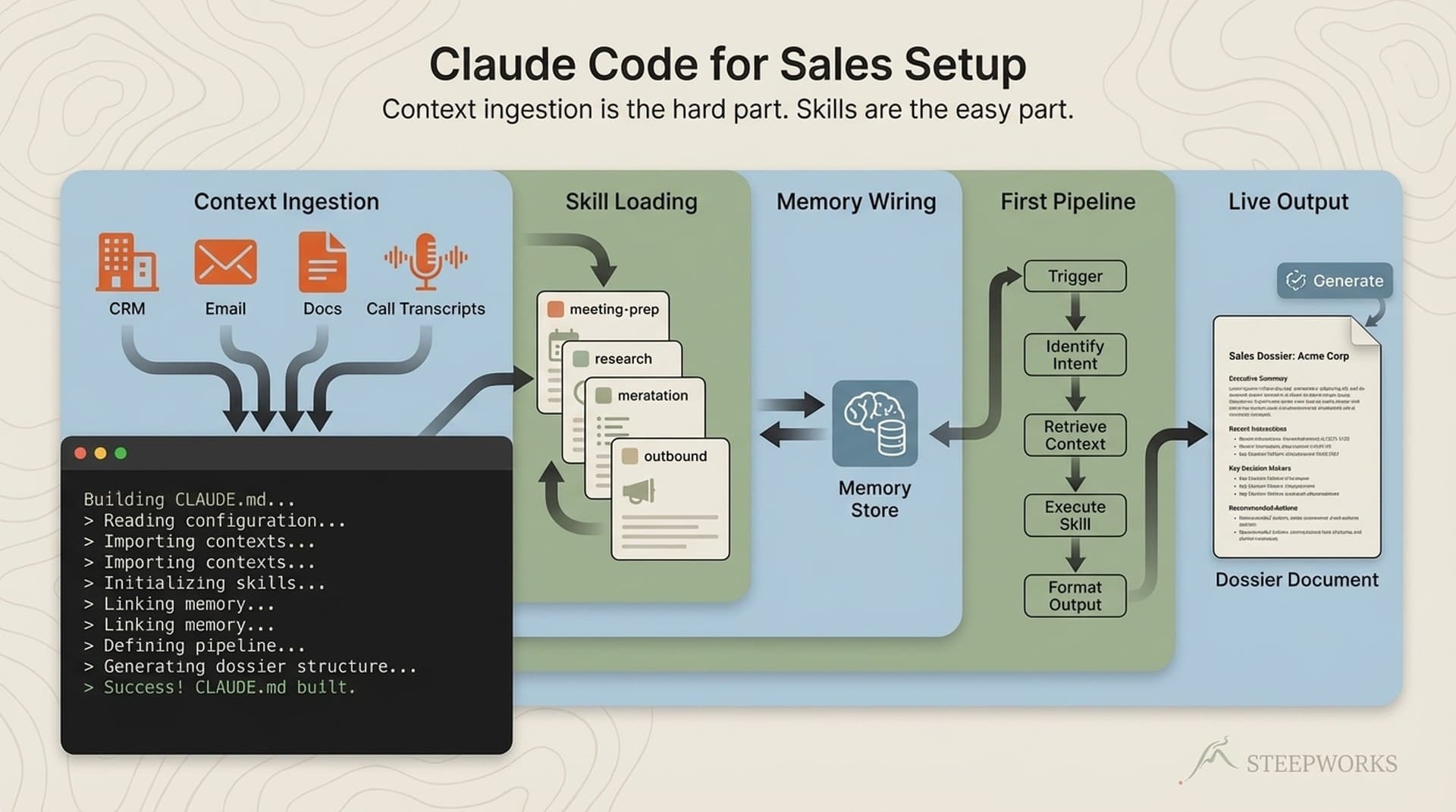
What it looks like in practice: you open Claude Desktop, click Code mode, and type "prepare a meeting dossier for my 2pm call with Acme Corp." The system reads your CLAUDE.md for ICP context, queries your CRM for deal history with Acme, pulls competitive intelligence, and produces a structured dossier. You read the dossier in the app window. No terminal involved.
This is the path I recommend for GTM leaders who want to use Claude Code directly. The learning curve is roughly 2-3 sessions (about 3 hours). The first session is mostly orientation. The second session is building your CLAUDE.md. By the third session, you're running skills and getting real output.
Surface 2: Abstracted Outputs (Your Existing Tools)
Some GTM leaders don't want another application. They want intelligence delivered into tools they already check daily. This is the abstracted output path.
Claude Code produces outputs as files. Those files can be routed anywhere: posted to a Slack channel, pushed to a CRM record, uploaded to a shared drive, or attached to a task in your project management tool. The routing happens through integrations, not manual copying.
What it looks like in practice: a scheduled Claude Code routine runs every Monday morning, pulls the week's pipeline data from HubSpot, cross-references it with competitive intelligence, and posts a deal health summary to a Slack channel. The VP of Sales reads it in Slack at 8:15am. She never opens Claude Code. She never sees a terminal. She gets intelligence that would have taken an analyst 3 hours to compile.
This path works for leaders who want Claude Code's output quality without Claude Code's interface. The setup requires a technical implementer (ops person, consultant, or AI-savvy team member) to configure the initial workflows. Once configured, the leader interacts only with their existing tools.
Surface 3: Claude Cowork (Desktop Chat)
Claude Cowork is Anthropic's desktop chat mode that provides a conversational interface to Claude Code's capabilities. It's lighter than full Code mode but heavier than standard chat. You get file access and basic skill triggers in a chat window optimized for back-and-forth conversation.
What it looks like in practice: a CS leader opens Cowork and says "pull the last 90 days of support tickets for Enterprise accounts and identify the top 3 recurring issues." Cowork reads the relevant data files, runs the analysis, and presents findings in the chat. The CS leader asks follow-up questions, refines the analysis, and gets a summary she can paste into her QBR deck.
This path suits leaders who want interaction without automation. It's the most conversational of the three surfaces and the closest to how most people already use AI chat tools. The difference from standard Claude chat: Cowork has access to your file system and knowledge base, so the analysis is grounded in your actual data rather than the model's training data.
Which Surface for Which Role
| Role | Recommended Surface | Why |
|---|---|---|
| CRO / VP Sales | Surface 2 (abstracted) | Intelligence delivered to Slack/CRM, reviewed in existing workflow |
| VP Marketing | Surface 1 (Desktop) | Direct content production and review, interactive editing |
| CS Leader | Surface 3 (Cowork) | Conversational analysis, ad-hoc queries, QBR prep |
| RevOps Director | Surface 1 (Desktop) | Pipeline configuration, skill building, system maintenance |
| Individual AE | Surface 1 (Desktop) | Meeting prep, prospect research, email drafting |
| Content Manager | Surface 1 (Desktop) | Full skill chain access for content production |
These are starting recommendations. Most users try 2-3 surfaces and settle on the one that fits their workflow. The VP of Sales who starts with abstracted outputs might switch to Desktop after seeing what's possible. The CS leader who starts with Cowork might move to Desktop once she wants to build custom analysis skills.
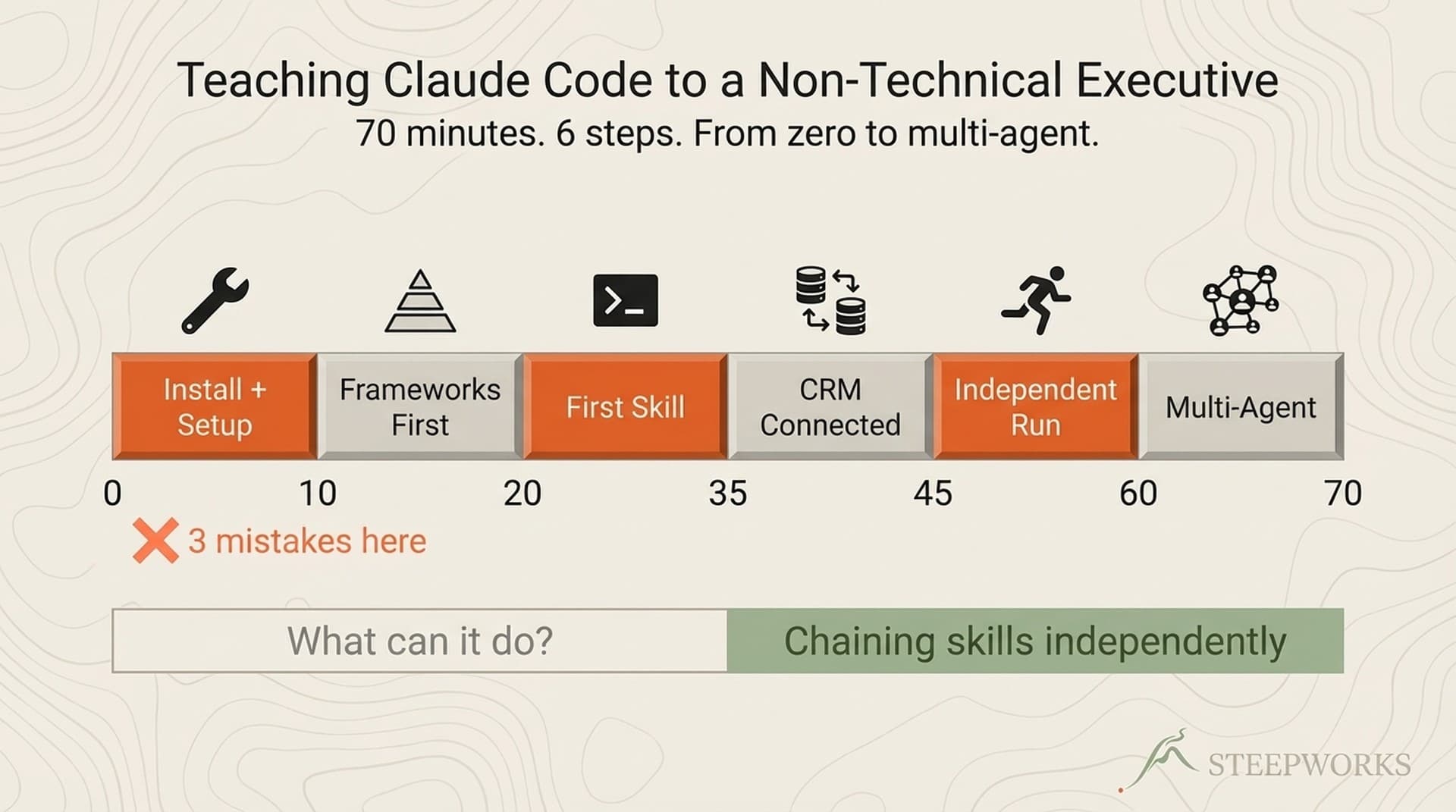
The 6-Step Onboarding for Non-Technical Leaders
This onboarding path has been tested across 12 non-technical operator rollouts at 4 organizations, including a PE-backed industrial company where the entire GTM team had zero terminal experience.
Step 1: Choose Your Surface (15 Minutes)
Don't default to the terminal. Read the three surfaces above and pick the one that matches your daily workflow. If you're unsure, start with Claude Desktop's Code mode. It's the most versatile and the easiest to switch from later.
Install the Claude Desktop app. If you have a Claude Pro, Max, or Teams subscription, you already have access. Click "Code" in the left panel. You're in Claude Code.
Step 2: Build Your CLAUDE.md (45 Minutes)
The CLAUDE.md is the instruction file that makes Claude Code understand your world. For non-technical leaders, focus on three sections:
Section 1: Who you are and what you do. Your role, your team, your primary responsibilities. This gives Claude Code working context.
## About Me
VP of Marketing at [Company]. B2B SaaS, Series B, 50-person team.
My team: 3 content marketers, 1 demand gen, 1 marketing ops.
Primary focus this quarter: pipeline-sourced content and competitive positioning.
Section 2: Your ICP. Who your company sells to, their pains, their decision criteria. This makes every output more relevant.
## Our ICP
Director+ at mid-market SaaS companies (200-2000 employees).
Top pain: "My team uses 6 AI tools and none of them talk to each other."
Decision criteria: Proven by practitioners, deploys in weeks not months.
Section 3: Your preferences. How you like information presented, what tone you use, what tools you reference daily.
## My Preferences
- Give me the bottom line first, details second
- Use bullet points over paragraphs for operational content
- Reference HubSpot, Salesforce, Gong by name -- those are our stack
- Don't say "best practices" -- tell me what specifically works
That's it. Three sections. 45 minutes. This CLAUDE.md is simple but functional. You'll expand it over time as you discover what context improves outputs. The important thing is starting with something, not starting with something perfect.
Step 3: Run Your First Skill (20 Minutes)
Pick one task you do regularly that takes 30+ minutes. For most GTM leaders, this is one of:
- Meeting prep for an important prospect call
- Competitive positioning for a deal against a known competitor
- Content brief for a blog post or newsletter section
In Claude Desktop, type what you need in natural language: "I have a call with [Company] at 2pm tomorrow. They're evaluating us against [Competitor]. Prepare a meeting dossier with deal history, competitive positioning, and 3 questions I should ask."
Claude Code reads your CLAUDE.md, uses the context about your ICP and preferences, and produces the output. Review it. Note what's useful and what's missing. The first output is typically 60-70% of what you'd want. That percentage improves as your CLAUDE.md gets more specific.
Step 4: Build Your First Workflow (30 Minutes)
A workflow is a repeatable sequence you'll run more than once. Take the skill you ran in Step 3 and make it consistent. (professional Claude Code implementation)
For meeting prep: create a template brief that specifies what you want in every meeting dossier. Company overview, deal history, competitive landscape, recommended talk track, questions to ask. Save this as a skill trigger.
For prospect research: specify your research priorities. CRM data first, then web. Include the confidence tier system so you know which claims are verified and which are inferred.
For content production: specify your voice standards, target audience, and content structure preferences.
The workflow takes 30 minutes to build. It saves 30+ minutes every time it runs. The breakeven is the second use. (free setup guide)
Step 5: Connect to Your Data (30 Minutes, May Need Help)
This step may require your ops person or IT support, depending on your tools.
Claude Code connects to external tools through MCP integrations. The connection gives Claude Code read access to your CRM, analytics, or communication tools. Common connections for GTM leaders:
- HubSpot/Salesforce: Deal data, contact history, competitive mentions
- Google Calendar: Upcoming meetings for automated prep triggers
- Slack: Output delivery channel
If your organization already has MCP integrations configured, this step is clicking "connect" in settings. If not, your ops person or IT team needs to set up the MCP server for your tool. Budget 1-2 hours for first-time setup (one-time cost).
If data integration isn't available, skip this step. Claude Code works without external tool connections. The outputs are based on the files in your workspace instead of live tool data. Many users start this way and add integrations later.
Step 6: Establish Your Weekly Rhythm (15 Minutes)
The leaders who get sustained value from Claude Code use it at predictable points in their week:
- Monday morning: Pipeline review or deal health check
- Before meetings: Meeting prep dossier (2-4 minutes per meeting)
- Wednesday: Content production or competitive intelligence refresh
- Friday: Weekly summary or team briefing draft
You don't need all four. Pick the one that saves the most time and make it a habit. Add others as the first becomes automatic.
The 12 operators I've onboarded who stuck past 30 days all established at least one weekly trigger point. The ones who treated Claude Code as "use it when I remember" dropped off within 2-3 weeks. Habit beats motivation.
Real Examples by Role
Sales Leader: Deal Intelligence
A VP of Sales at a PE-backed industrial company uses Claude Code through abstracted outputs. Every Monday, a scheduled routine:
- Queries HubSpot for all deals in stages 2-4
- Cross-references each deal's competitive mentions with the competitive intelligence knowledge base
- Flags deals where competitive positioning hasn't been updated in 30+ days
- Posts a summary to the #sales-intelligence Slack channel
The VP reads the summary at 8:15am Monday. She responds with follow-up questions in Slack. The ops person routes those questions back through Claude Code and posts answers. Total VP time investment: 10 minutes per week. Previous manual process: ops analyst spent 3 hours compiling the same report.
Marketing Leader: Content Production
A Director of Content Marketing uses Claude Desktop to run the content production pipeline:
- Opens a quarterly content brief with 12 target topics and keywords
- Triggers produce-content on the next brief in the queue
- Reviews the draft, adds 2-3 operator-specific examples from real work
- Triggers edit-content for voice consistency and anti-slop checking
- Triggers social-post-generator for distribution assets
Time per article: 90 minutes from brief to publish-ready, including social posts. Previous process: 5-6 hours. She produces 3 articles per week instead of 1, with higher voice consistency because the system enforces brand standards that manual editing misses on tired Fridays.
CS Leader: Account Intelligence
A Head of Customer Success uses Cowork for ad-hoc analysis:
"Show me the top 5 enterprise accounts by support ticket volume this quarter. For each one, what's the primary issue category and when was the last executive check-in?"
Cowork reads the support data export (CSV dropped in the workspace weekly by the ops team), cross-references with the account health tracking file, and produces a structured answer. The CS leader asks follow-ups: "For Account X, pull the last 3 support tickets and summarize the themes." The conversation continues until she has what she needs for the QBR.
Total time: 12 minutes. Previous process: exporting from Zendesk, filtering in Excel, cross-referencing with CRM manually. 45 minutes minimum, often abandoned mid-process because something more urgent came up.
The CCO Who Started It All
The most complete non-technical rollout I've done was at a PE-backed industrial company with a 5-country engineering services footprint. Their CCO had never used a terminal on purpose. His exact words when we started: "I'm not a power terminal person."
Within 70 minutes of his first session, he was running multi-agent planning workflows independently. Not because I taught him terminal commands. Because I translated the system into his mental model: "Think of it as three buckets. Who we sell to. What we know about the market. What we're doing about it."
That mental model stuck because it mapped to how he already thought about GTM. The terminal commands were secondary. He learned them by doing, not by studying. By the end of week 2, he'd independently upgraded from Pro to Max after exhausting his credits on deep planning sessions. His goal, as he stated it: "less about you do and more about me learn, because I want this extensible over time."
He then asked me to train his team. Five people, five different roles, five different levels of resistance. That team rollout became the basis of the 6-step playbook I published separately. The short version: the CCO became the internal champion, his conviction carried more weight than my consulting expertise, and the team adopted Claude Code at 4 of 5 roles within 30 days. The fifth role (pure admin) was a poor fit for the tool and we acknowledged that honestly rather than forcing adoption.
The lesson from that engagement: non-technical adoption is a translation problem, not a training problem. You don't teach people the terminal. You translate the system into their existing mental model. The terminal (or Desktop, or Cowork, or abstracted outputs) is just the surface.
What Doesn't Work for Non-Technical Users
Honest assessment of the limitations:
Building custom skills from scratch. Creating a new skill definition requires understanding file paths, YAML frontmatter, and prompt engineering. Non-technical users can trigger existing skills. Building new ones typically needs an ops person or consultant. This is the primary limitation of the no-code path.
Debugging when things go wrong. When a skill produces unexpected output, diagnosing the cause requires reading log files and understanding the system's context loading. Non-technical users can describe the symptom ("the meeting prep is missing competitive data") but the fix usually needs someone with system knowledge.
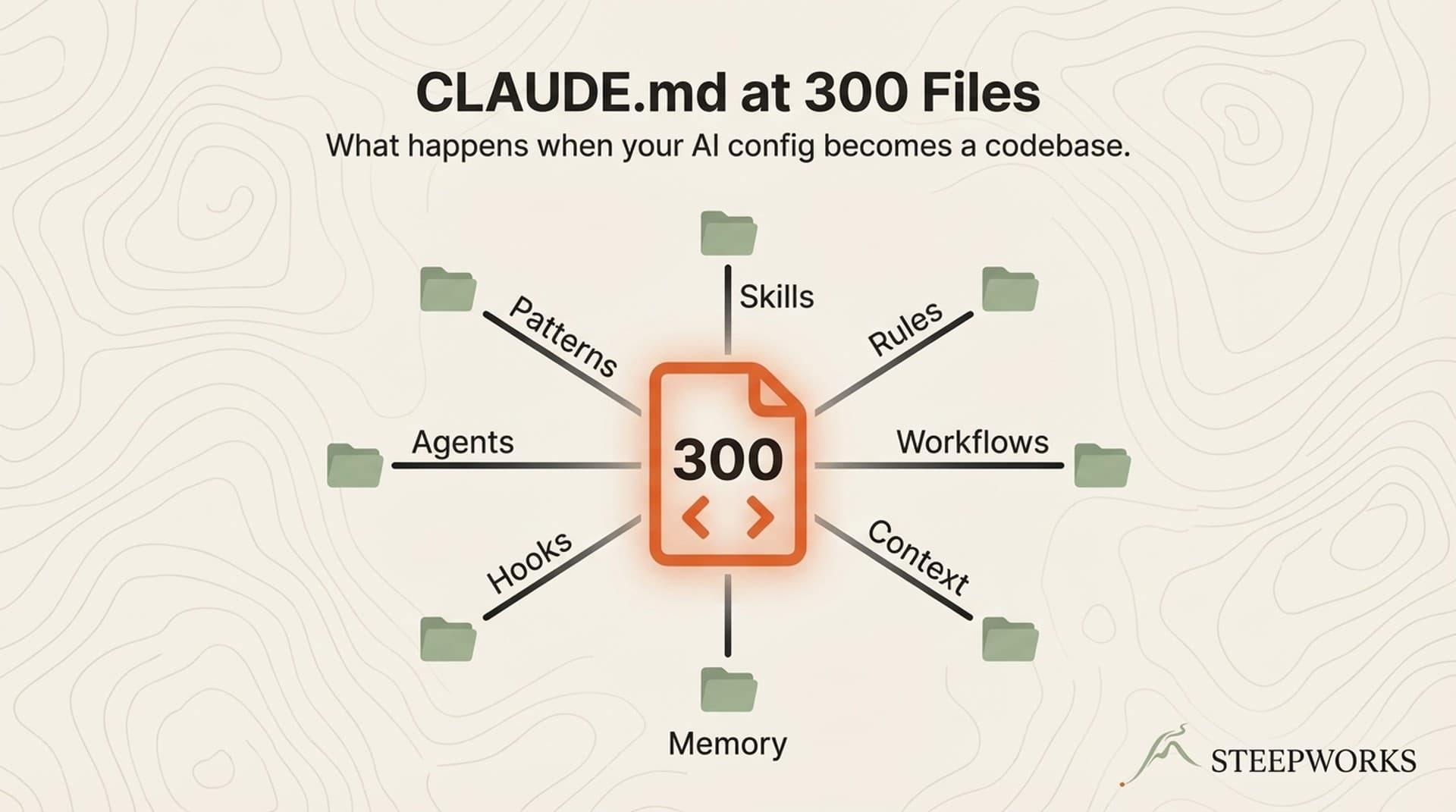
Initial CLAUDE.md architecture. The 3-section CLAUDE.md in Step 2 works. A production-grade CLAUDE.md with workstream routing, conditional rule loading, and skill chain orchestration is a 4-8 hour project that benefits from architectural thinking. Most non-technical leaders use a basic CLAUDE.md initially and have their ops person or a consultant build the full version.
Complex multi-agent orchestration. Running a 7-agent debate for newsletter production or a multi-step research pipeline with confidence tiers is power-user territory. The outputs are valuable to non-technical leaders. The orchestration is not a no-code activity.
These limitations are real. They're also the same limitations that apply to any configurable business system. A CRO doesn't configure Salesforce from scratch. An ops person does, and the CRO uses it. Claude Code follows the same pattern: build once, use many.
The ROI Calculation
For a GTM leader spending 15+ hours per week on tasks Claude Code can assist with (meeting prep, competitive research, content review, deal analysis, team briefings):
- Setup cost: 4-8 hours (Steps 1-6, including help from ops person)
- Weekly time savings: 5-8 hours (conservative, based on 12 rollout measurements)
- Breakeven: Week 2
- Monthly subscription: $20-200 depending on tier
- Monthly value at $100/hour loaded cost: $2,000-3,200 in recovered time
The time savings come from three sources: eliminated context-loading (no more re-explaining your ICP every session), automated multi-step workflows (meeting prep that took 40 minutes takes 4), and consistent quality that reduces revision cycles.
These numbers are from actual measurement across our 12 onboardings. The floor (5 hours/week) assumes conservative adoption with meeting prep and basic content assistance. The ceiling (8 hours) assumes full adoption across competitive intelligence, content production, and deal analysis.
Frequently Asked Questions
Do I need to learn any technical skills to use Claude Code?
Through Claude Desktop's Code mode, no. The interface is a chat window. You type what you need in natural language. The technical skills become relevant if you want to build custom skills, configure integrations, or debug issues. For daily use as a GTM leader, natural language input through the visual interface is sufficient.
How is this different from just using Claude chat (without Code mode)?
Standard Claude chat starts fresh every session. It doesn't know your ICP, your competitive landscape, your voice standards, or your deal history unless you paste that context each time. Claude Code mode loads your CLAUDE.md automatically, accesses your file system, connects to external tools, and runs multi-step skills. The difference is between a smart conversation partner and a configured system that knows your business context persistently.
Can my existing ChatGPT workflows be migrated to Claude Code?
Yes. ChatGPT Custom Instructions map to CLAUDE.md sections. ChatGPT Projects map to workstream routing. GPTs map to Claude Code skills. The migration typically takes a day: extract existing instructions and project configurations, restructure into CLAUDE.md and skill definitions. File system access and skill chains don't have ChatGPT equivalents, so those are net-new capabilities.
What subscription tier do I need?
Claude Pro ($20/month) provides full Claude Code access with usage limits. Claude Max ($100 or $200/month) provides higher usage limits for heavy use. Most GTM leaders start with Pro and upgrade to Max within 3-4 weeks if they're using Claude Code daily. The upgrade decision is usually driven by hitting usage limits during intensive meeting prep or content production weeks. Teams can use Claude Teams for shared billing and collaborative features.
How do I get my IT team comfortable with Claude Code accessing company data?
Three points that address common IT concerns: Claude Code runs locally on your machine, not in the cloud (your files don't leave your computer unless you explicitly connect to an external service). MCP integrations use OAuth authentication with the same permission model as other authorized apps. And Claude Code's permission system asks before every sensitive action, so nothing happens without explicit approval. For regulated industries, the local-first architecture is often simpler to approve than cloud-based AI tools.
What if I try it and it doesn't work for my role?
You'll know within the first week. If Steps 1-3 (choose surface, build CLAUDE.md, run first skill) don't produce obviously useful output, the tool may not fit your role. Roles with minimal research or content components get less value. Roles with heavy research, content production, or deal preparation get the most. Each step delivers standalone value, so you can stop at any step that doesn't justify the next investment.