Before I built this system, AI prospect research in my pipeline happened two ways: thoroughly — 20 to 30 minutes per prospect, done inconsistently — or not at all. The "I'll wing it" approach that every rep has used at least once, usually more than once. The problem was never ability. Any competent rep can research a prospect. The problem was that manual research doesn't compound and commercial tools dump data without context.
The numbers bear this out. Sales reps spend roughly 45% of their week on manual prospect research — about 10 hours — at approximately $100/hour in loaded cost. Only 28% of their week goes to actual selling. The math is painful: your most expensive people spend most of their time not doing the thing you hired them for.
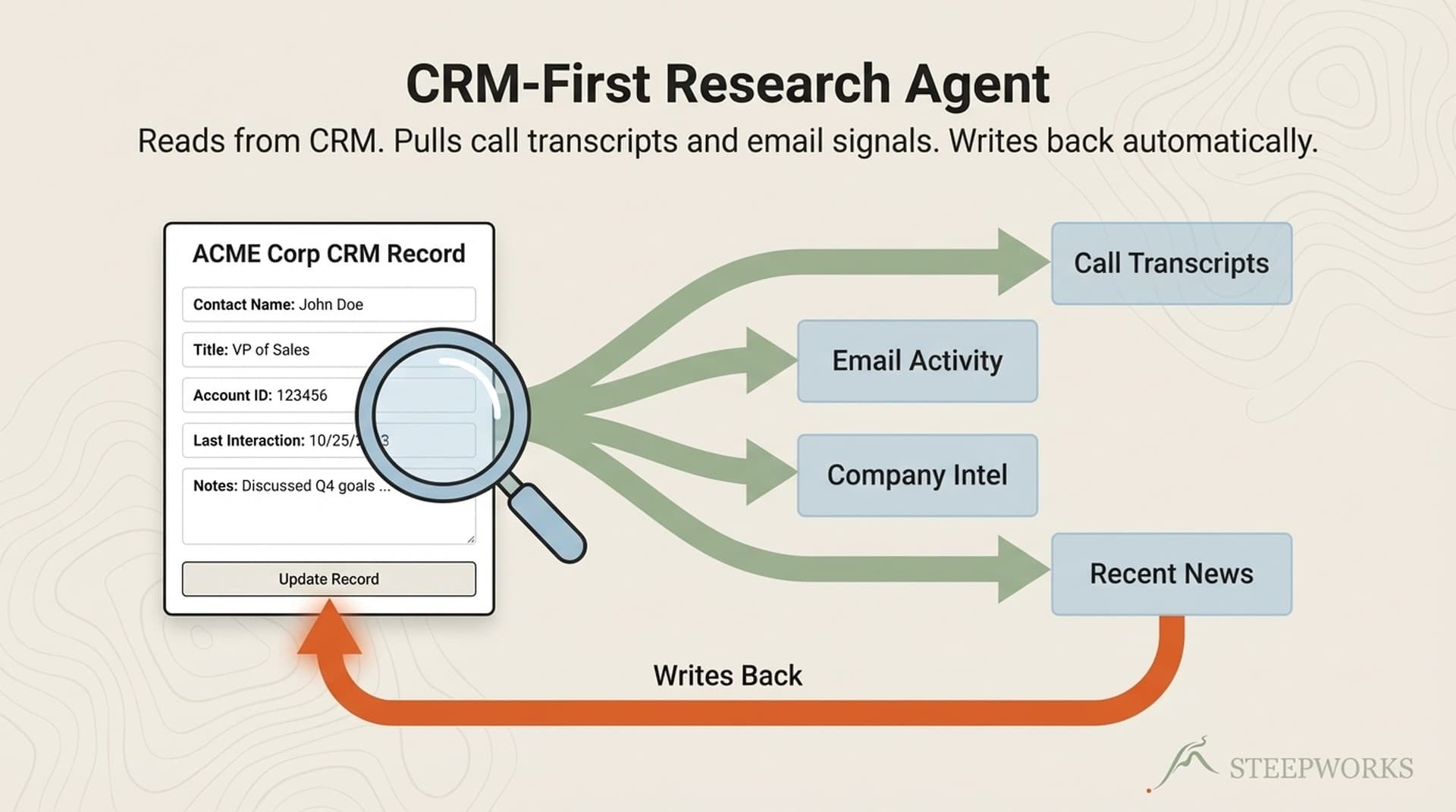
What I built instead: an AI agent that follows a strict data source hierarchy (CRM first, then web), produces structured research notes with confidence flags, and writes them directly into CRM contact records. Not a Chrome extension. Not a tool review. A production system that's been running for over a year. The full build took 2-3 weeks of part-time work, mostly prompt iteration.
Who this article is for:
- Technical GTM operator who wants to build the full agent end-to-end — this is your blueprint.
- RevOps or Sales Ops lead specifying this for a developer or evaluating build vs. buy — the architecture sections give you the requirements doc.
- Any rep who wants better prospect research today — skip to "Build This Monday Morning" for a 30-minute manual version that delivers 60% of the value with zero engineering.
CRM First, Then Everything Else
This is the single most important architectural decision in the agent, and it's the one that every commercial AI prospect research tool gets wrong. They all start with web data. This agent starts with CRM data.
The hierarchy:
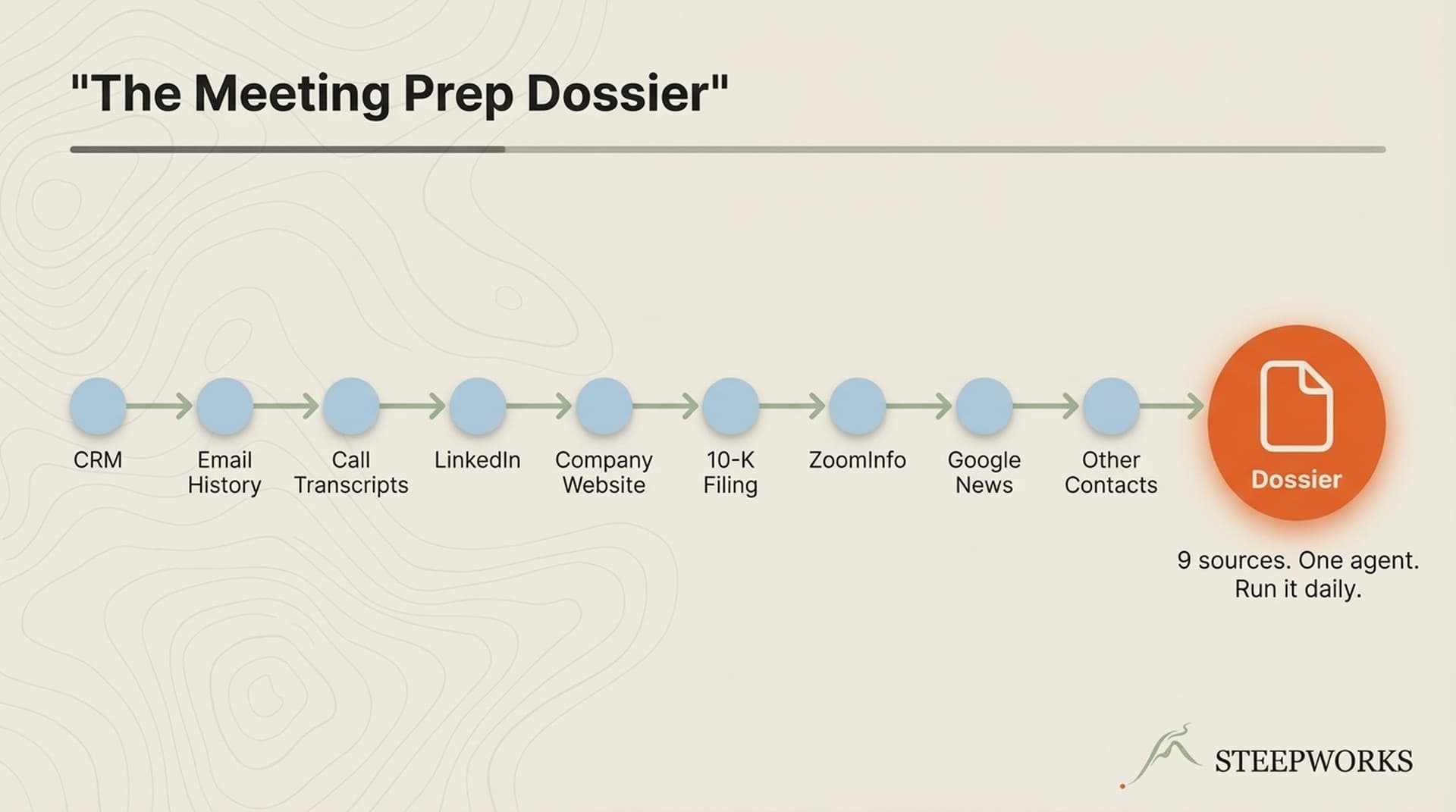
(0) CRM data — HubSpot, Salesforce, whatever you run. Prior deals, engagement history, contact properties, notes from past calls. This is the highest-signal data you own. Most teams never query it systematically.
(1) Web search — LinkedIn profiles, company websites, recent news, press releases, funding announcements. Fresh but noisy. Good for context, not for closing.
(2) Enrichment platforms — Firmographic and technographic data from Clay, Apollo, ZoomInfo, or similar. Structured but shallow. Tells you company size and tech stack, not buying intent.
(3) Internal docs — Prior meeting notes, email threads, Slack conversations. Institutional memory that usually lives in someone's head or, more likely, nowhere.
Why CRM first matters. The moments that change deals — "I see you evaluated us 18 months ago and chose [competitor]. What's changed?" — come from CRM data, not web data. Your CRM knows about open support tickets, the churned champion who just resurfaced at a new company, the deal that stalled in legal review last quarter. No LinkedIn scrape surfaces that.
The architecture handles absence gracefully. If CRM returns nothing (new prospect, empty fields, no prior record), the agent falls through to web research. You never get a blank output. You get a web-first research note flagged with "[No CRM history found — web research only.]" Running the agent regularly actually exposes CRM gaps — it becomes a forcing function for data hygiene.
The hierarchy is CRM-agnostic by design. The agent doesn't hardcode a specific platform — it detects available CRM tools at runtime through pattern matching. Any CRM with an API works. The principle is platform-independent: start with what you already own before reaching for external data. I wrote about how this data hierarchy fits into a broader AI GTM architecture — the prospect research agent is one node in a larger system.
Freshness matters too. CRM data less than 90 days old gets HIGH precedence. Between 90 and 365 days, it's flagged as stale but still useful. Beyond a year, it's historical context only — worth noting but not worth leading with. Web research supplements but never overrides recent CRM data.
The Research Prompt — What to Ask and Why
The prompt is the brain of the agent. Most AI prospect research prompts are too broad ("research this company") or too narrow ("find their tech stack"). The production prompt I run follows a specific design pattern: five structured sections, each with a rationale for why that information helps close deals.
1. Company snapshot. What they do, how big they are, recent trajectory. Not a Wikipedia summary. Three sentences that tell you whether this company is growing, contracting, or pivoting. Rationale: you need 30-second context before the call, not a research paper.
2. Stakeholder map. Key people relevant to your deal — roles, tenure, and public signals (recent posts, job changes, conference talks). Rationale: knowing who's in the buying committee before the prospect tells you changes the entire conversation.
3. Pain signal detection. Job postings, news mentions, earnings calls, or public statements suggesting specific pain points your product addresses. These are hypotheses about pain, not assumptions. "They're hiring 3 SDRs" means something different than "They just laid off their CTO." Rationale: evidence-grounded hypotheses let reps probe instead of guess.
4. Prior relationship context. Everything your CRM knows about this person and company. Past deals, email history, meeting notes, support interactions. Rationale: this is the CRM-first payoff. A rep who knows about last quarter's failed POC walks in with credibility.
5. Conversation starters. Three specific, non-generic talking points derived from the previous four sections. Not "How's business?" but "I noticed you're expanding into APAC based on those Singapore job postings — are you finding that your current platform scales internationally?" Rationale: the point of research is to start better conversations, not to have better files.
What the prompt explicitly excludes: Generic company descriptions any Google search returns. Stock price movements unless directly relevant. Social media follower counts. Vanity metrics that look thorough but waste attention.
The upstream/downstream separation. The research prompt is an upstream agent — it describes reality and preserves optionality. It does not score leads, recommend actions, or decide whether to pursue the deal. That's a downstream agent's job. Mixing research and recommendation in one prompt contaminates both. I've written about this separation principle in detail — it's the single most important design pattern in any AI research system.
The production implementation chains six existing prompt assets rather than rebuilding research capabilities from scratch: prospect research, discovery call prep, ICP buyer role classification, company pain investigation, tech stack discovery, and conversation prep. Different meeting types activate different research depths — a sales discovery call gets the full five-phase treatment plus qualification framework mapping, while an informational meeting gets light attendee research only. Not every call needs the same depth.
Structured Output — The Format Reps Actually Read
Unstructured AI output is the reason most teams abandon AI research tools within weeks. A wall of text "summarizing" a company is worse than no research — it takes time to read and doesn't surface the one thing that matters for your specific call.
The output schema:
company_snapshot: 3-sentence orientation (what, how big, trajectory)
stakeholder_map: [{name, role, tenure, signals}]
pain_signals: [{signal, source, confidence_tier}]
prior_relationship: {last_interaction, deal_history, notes_summary}
conversation_starters: [3 specific, sourced talking points]
research_metadata: {sources_consulted, crm_hit, timestamp}
Why structured over prose. Reps have 2-3 minutes before a call. They scan, they don't read. A structured note with headers and bullet points gets consumed. A 500-word paragraph gets skipped. The format mirrors what a good EA would put on your desk before a meeting — scannable, hierarchical, actionable.
Confidence tiers. Every data point includes a confidence flag:
- VERIFIED — From CRM or confirmed public source.
- INFERRED — Deduced from multiple signals.
- SPECULATIVE — Worth mentioning, not worth betting on.
This matters because reps who state inferred information as fact in meetings lose credibility. The flag teaches reps to qualify their own assertions. In the production system, every CRM-sourced claim carries provenance tags — [CRM: HubSpot, as of ] — so the rep knows exactly how fresh the data is.
What I cut. The first version of this schema had 12 fields. I cut it to 7. The fields I removed — competitor analysis, full tech stack detail, org chart, executive bios, industry overview — were things that looked useful in theory but nobody read in practice. I tracked which fields reps actually referenced in follow-up emails and call notes. Five fields were never referenced once. Cut them. Adoption recovered.
The litmus test: if a field doesn't change how the rep opens the call, it's noise.
Writing Back to CRM — The Architecture Nobody Shows
Most AI prospect research articles end at "here's the output." They skip the hardest and most valuable part: getting research back into the CRM where reps actually work. If it lives in a Slack message or a Google Doc, it's dead within a day. If it lives in the CRM contact record, it's available to every rep on every call for the life of the relationship.
Why notes, not custom properties. The write-back target is CRM notes (activity timeline), not custom contact properties. Custom properties are for structured, filterable data — industry, company size, lead score. Research notes are contextual, timestamped, and narrative. Putting AI research into custom properties creates 30 new fields that pollute your CRM schema. Notes are additive, timestamped, and searchable without schema changes.
The write-back pattern:
- Agent completes research, produces structured output.
- Output is formatted as a CRM note with a standard header:
[AI Research — — Sources: CRM, Web, Enrichment] - Note is written to the contact record via CRM API (HubSpot Notes API, Salesforce Task/Note API).
- If the contact doesn't exist, the agent creates a minimal contact record first, then attaches the note.
- A
last_researcheddate property is updated on the contact — this prevents duplicate research runs and enables "research freshness" filtering in list views.
Safety patterns. The agent uses narrow, business-scoped API operations — create_note, update_contact_property — not raw API access. This is the pattern Truto recommends for production AI-CRM integrations: give the agent the smallest tool that accomplishes the task. No bulk updates. No schema modifications. No delete operations. You want the agent writing notes, not restructuring your CRM.
What this enables downstream. Once research lives in CRM notes, other systems compound on it. Meeting prep skills pull from it. Outreach personalization references it. Deal review dashboards surface it. The research compounds because it's in the system of record, not in a throwaway chat window.
What's Actually Useful vs. What's Noise
No vendor will write this section because their business model depends on you believing that more data equals better research. It doesn't. The most expensive mistake in AI prospect research is collecting information that looks impressive but doesn't change behavior.
What I removed:
- Company mission statement — Every company says they're "transforming" their industry. Useless for conversation. Cut after week 2.
- Full org chart — Knowing the CEO's name doesn't help when you're selling to the Director of Engineering. The stakeholder map focuses on people relevant to your deal, not the full hierarchy.
- Exhaustive tech stack list — A list of 47 technologies is noise. The agent now surfaces only technologies relevant to your product's integration points or competitive landscape.
- Social media activity volume — "They post 3x/week on LinkedIn" tells you nothing. Replaced with specific post content that reveals priorities or pain.
- Unconfirmed competitor usage — Speculating about which competitors a prospect uses, based on job posting keywords, produced too many false positives. Now flagged as SPECULATIVE with source citation so reps decide whether to use it.
Before and after:
Before (noisy): "Acme Corp is a 500-person B2B SaaS company founded in 2015. They use Salesforce, Marketo, and Outreach. Their CEO recently posted about AI transformation. They have 12 open job postings."
After (useful): "Acme Corp (500 employees, Series C, ~$45M ARR) is hiring 3 SDRs and a RevOps Manager — suggesting pipeline pressure. Their VP Sales posted last week about CRM data quality issues. Prior relationship: evaluated us in Q3 2025, paused due to budget freeze. Champion (Dir. Sales Ops) is still there. Start with: 'I know you looked at us last year — what's changed on your side?'"
The difference: the first version is a Wikipedia entry. The second changes the first five minutes of the call.
What Broke and What I Changed
No engineering notebook is honest without the failure section. This agent has been through three major revisions.
Failure 1: Web-first research produced generic output. The first version started with web search. The output read like a company Wikipedia page. Reps glanced at it and never opened it again. Fix: CRM-first hierarchy. The output immediately became specific to the rep's relationship with the prospect, not a generic company profile.
Failure 2: Unstructured output killed adoption. Version 1 produced prose paragraphs. Reps don't read paragraphs before calls — they scan. Adoption dropped to near-zero within two weeks. Fix: structured output schema with headers, bullet points, and conversation starters at the bottom where the eye naturally goes when scanning.
Failure 3: Too many fields created data fatigue. The structured schema started with 12 fields. Reps reported "it's a lot" and started skipping the note entirely. I tracked which fields reps actually referenced in follow-up emails and call notes. Five fields were never referenced. Cut to 7. Adoption recovered.
Failure 4: Research without write-back is disposable. For the first month, the agent produced output in a terminal window. Reps would copy-paste into CRM notes maybe 30% of the time. The other 70% evaporated. Fix: automated write-back. Research goes directly into CRM notes without rep intervention. Adoption isn't a choice anymore — it's the default.
Honest hit rate: The agent produces genuinely useful, call-changing research about 60-70% of the time. The other 30-40% is serviceable but not revelatory — usually because the prospect is truly new (no CRM history) and public information is thin. The CRM-first hierarchy is why the hit rate is as high as it is: when there's CRM data, the output is almost always good.
Build This Monday Morning
You don't need my full agent architecture to get value from AI prospect research this week. Here's a 30-minute setup that delivers 60% of the value.
The manual version:
- Open your AI assistant (Claude, ChatGPT, whatever you use).
- Paste this prompt pattern:
Research [company name]. Start with what I already know: [paste relevant CRM notes or deal history]. Then search the web for recent news, key people, and signals that suggest they might need [your product category]. Produce a structured note with: (1) 3-sentence company snapshot, (2) key stakeholders relevant to my deal, (3) pain signals with sources, (4) 3 conversation starters that reference specific findings. Flag anything speculative.
- Before your next call, run this with whatever CRM data you have. Paste the output into a CRM note on the contact record.
- After 5 calls, notice which sections you actually used. Cut the rest.
What the manual version misses: Automated CRM read (you manually paste CRM context). Automated write-back (you manually paste into CRM). Enrichment platform integration. Batch processing for prospect lists. These are the things that make the full agent a system rather than a workflow. But the core — CRM-first research with structured output — works at any scale.
When to invest in the full build: When you're running this manually for 10+ prospects per week and the copy-paste overhead feels like the bottleneck. That's the signal that automation pays for itself. The full agent (CRM read, AI research, structured output, CRM write-back) took about 2-3 weeks of part-time engineering. Most of that time was prompt iteration, not infrastructure.
Where STEEPWORKS fits: The Knowledge OS includes the prospect research agent as a pre-built skill — CRM integration, structured output, write-back pipeline, and the prompt patterns described in this article. If you'd rather configure than build, that's what it's for.