The Last-Mile Problem Nobody Talks About
Generating AI sales intelligence is close to a solved problem. Clay, ZoomInfo, Gong, 6sense -- dozens of platforms can produce account research, prospect dossiers, intent signals, and competitive analysis. The hard part is not the intelligence. The hard part is getting a sales rep to actually read it and take action.
The AI sales intelligence industry is worth billions, but the adoption numbers tell a quieter story. Fewer than 37% of sales reps consistently use their CRM, and 76% of companies cite poor tool adoption as a reason they miss quota. Gartner predicts 95% of seller research workflows will begin with AI by 2027. But workflows that begin with AI still need to end with a human who takes action. A contact in a sequence. A pre-drafted email. Research visible in the same screen where the rep works.
The gap is not intelligence quality. It is the last mile -- getting that intelligence into a format, location, and workflow where a non-technical salesperson can consume it and act. Not read-and-forget. Act.
I learned this the hard way. At a consulting engagement with an industrial company, I built an AI sales intelligence system that generated high-quality account research, prospect dossiers, ICP scores, talk tracks, and draft outreach emails. The intelligence was strong. The delivery format killed adoption.
"The markdown files to me are not a good visualization or input mechanism for the general person." That was the Chief Commercial Officer, speaking plainly about what I thought was finished work.
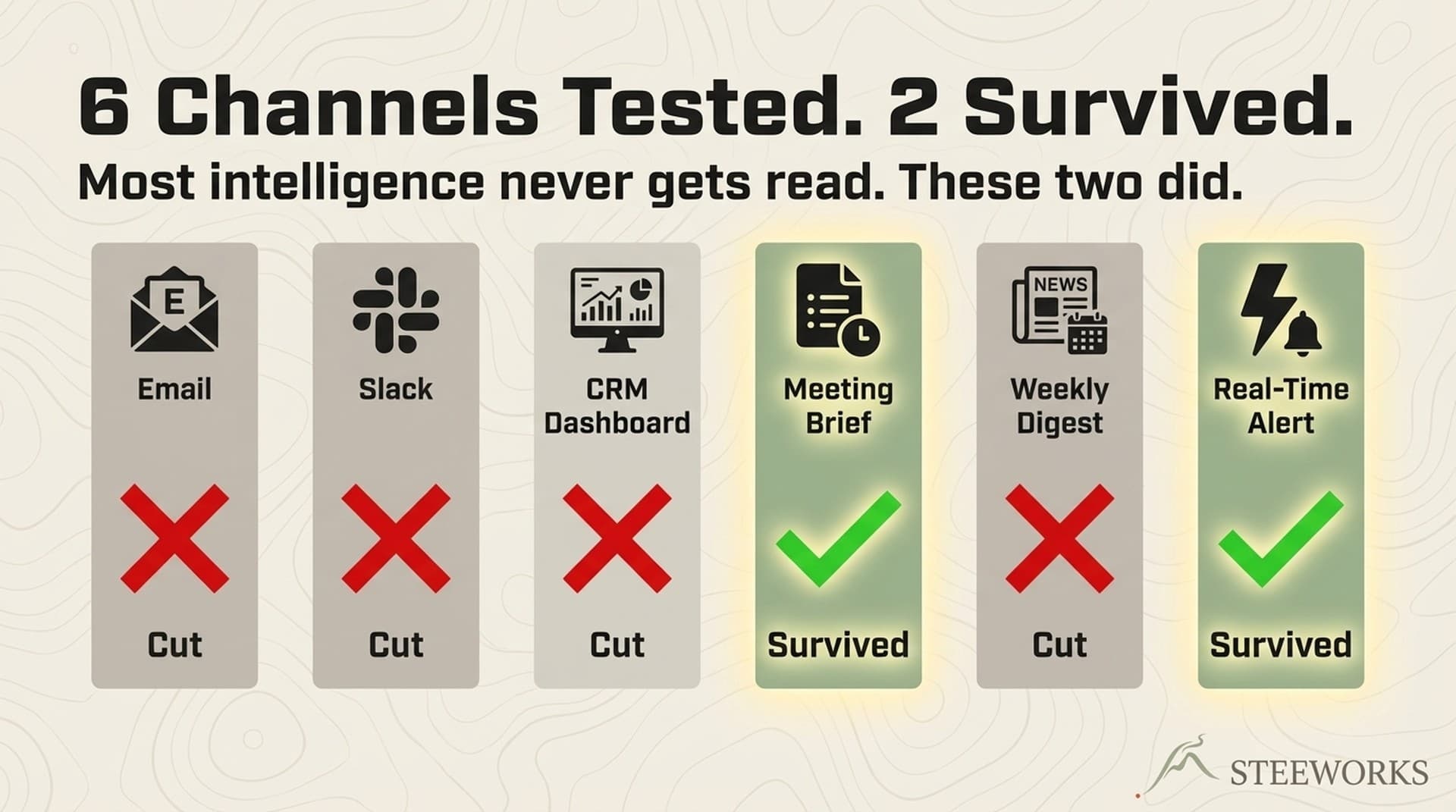
This article documents 6 delivery channels I tested at that engagement. 4 failed. 2 stuck. The pattern behind why is more interesting than any individual channel.
The Company, the Team, and Why This Was Hard
Context matters. The evaluation happened at an industrial company with a small sales team -- the kind of environment where you can observe adoption behavior directly, not through dashboards.
The sales team: 4 internal reps managed by a sales manager, overseen by a CCO. Email-centric -- they live in Outlook, not CRM. HubSpot exists but is not their daily habitat. The CCO's learning style: frameworks before tools. He wants the mental model, not the feature list. Self-described "not a power terminal/AI person."
My system generated 6 types of intelligence: account research briefs (1,500-2,500 words), prospect dossiers (800-1,200 words), ICP scoring, talk tracks, draft outreach emails, and campaign briefs (2,000-3,000 words). The intelligence was accurate. The problem: it was delivered as raw markdown files in a Git repository. For me, that was fine. For the sales team, it was a wall of text in a format they had never seen.
The CCO asked: how do we get this intelligence where my team can actually use it? And not just read it -- use it. Contacts loaded into sequences. Pre-drafted emails ready to send. Research inline when they are looking at an account. That question launched a systematic evaluation of 6 delivery channels.
I've since applied the same framework at SaaS companies with 15-30 person sales teams. The pattern holds. The specific channel that wins changes based on CRM maturity and team workflow habits. But the 3 properties that predict success do not.
6 Delivery Channels -- Tested, Ranked, Judged
Not theoretical. Each channel was evaluated against 5 dimensions: build effort, scalability, maintainability, user experience, and workflow integration. Then tested with the real team. Here is the terrain before I go deep on each.
| Channel | Survived? | Why | Consumption Rate |
|---|---|---|---|
| Slack / Teams alerts | No | Alert fatigue in 48 hours | Day 1: high. Day 3: muted |
| Email intelligence digests | No | Read-and-forget. No retrieval | Open: ~78%. Retrieval within 7 days: <5% |
| CRM custom fields | Yes | Intelligence at point of action | ~70% of pre-call record views |
| Interactive dashboard | No | "Another tool" resistance | Week 1: moderate. Week 3: near zero |
| Weekly PDF report | No | Stale before delivery | Opened: ~40%. Read fully: <15% |
| In-meeting prep dossier | Yes | Immediate, high-stakes context | ~100% within 2 hours of delivery |
Channel 1 -- Slack / Teams Alerts
What I built: Real-time alerts pushed to a deal channel when new intelligence arrived on an account -- intent signals, new contacts identified, competitive movements.
What happened: Alert fatigue within 48 hours. The first day, the team read every alert. By day 3, the channel was muted. By week 2, nobody could remember which channel the alerts were in.
Why it failed:
Alerts compete with every other notification on every other platform. A Teams message about an account's new hire has to fight a customer escalation, a Jira ticket, and a lunch order for attention. No context hierarchy -- every alert looked the same whether it was "new Fortune 500 account showing intent" or "contact updated their LinkedIn headline." And there is a deeper structural problem: Slack alerts push information at reps. But intelligence consumption works better as pull -- reps need it when they are ready, not when the system generates it.
The pattern: Push-based channels fail when the push volume exceeds the team's absorption capacity. For a 4-person team getting 20+ alerts per day, that threshold was about 48 hours.
Channel 2 -- Email Intelligence Digests
What I built: Branded HTML email briefs sent to each rep's Outlook inbox. One account per email. Clean formatting, structured sections: company overview, pain signals, urgency score, recommended angle, talking points.
What happened: Open rates were strong -- most reps opened the emails. Retention was zero. The briefs were read once and buried under the next 50 emails. When a rep needed account intelligence two days later, they could not find it.
Why it failed:
Email is a consumption medium, not a retrieval medium. Reps read the brief, nodded, and forgot it. No searchability -- "What did the research say about that defense contractor's hiring signals?" requires digging through an inbox, not pulling up a CRM record. Timing mismatch: the brief arrived when the system generated it, not when the rep needed it. A Tuesday morning email about an account whose meeting is Thursday afternoon gets buried by Wednesday.
What it got right: Zero behavior change required. The email arrived in Outlook where the team already lives. User experience scored high. But consumption without retention is not intelligence -- it is content marketing for your own sales team.
Channel 3 -- CRM Custom Fields (Winner #1)
What I built: AI research decomposed into structured HubSpot properties: ai_research_summary, ai_urgency_score, ai_pain_points, ai_tech_stack, ai_last_researched, ai_icp_score. Longer narrative went into timeline notes. Every time the research agent ran, these fields updated automatically.
What happened: This was the first channel where reps actually retrieved intelligence unprompted. When preparing for a call, they pulled up the HubSpot record and the AI fields were right there -- no extra clicks, no new tool, no searching through emails.
Why it worked:
Intelligence at the point of action. The rep is in HubSpot to log a call or check deal stage. The AI fields are on the same screen. Zero friction. And the intelligence did not just sit there passively -- it became the basis for action. The sales manager could build a HubSpot view: "Show me all accounts with urgency score above 7 that I haven't contacted in 30 days." That view fed directly into outbound sequences. Contacts with high ICP scores got added to targeted cadences. Draft email copy, generated from the same research, sat in timeline notes ready to be adapted and sent.
CRM fields compound. Every research run adds data. After 3 months, each account had a research history -- not just the latest snapshot, but a timeline of intelligence that showed how signals evolved. The CCO could build pipeline views around AI scores. This turned intelligence from "nice to have content" into workflow infrastructure.
The caveat: This only works if the team uses the CRM. At this company, HubSpot adoption was aspirational, not habitual. The CCO admitted: "It would be nice if they're living in HubSpot day in, day out. But I don't think that's the reality of the business." CRM fields are the right long-term investment. For teams not yet CRM-native, you need a second channel that meets reps where they already work.
Industry validation: Every mature AI sales intelligence platform -- Clay, Gong, 6sense, Apollo, HubSpot Breeze -- leads with CRM-native delivery as the primary channel. This is not an accident. Momentum's 2025 buyer's guide documents the convergence toward CRM-embedded intelligence across the category.
Channel 4 -- Interactive Dashboard
What I built: A purpose-built web application -- account cards with search, filter, and drill-down. Think "Clay's table view meets Gong's deal board" but for AI-generated research. Built on Next.js, deployed on Vercel.
What happened: The demo was impressive. The team said "this is great." Nobody used it after week one.
Why it failed:
"Another tool" resistance. The 4-person team already had Outlook, HubSpot, OneDrive, and their industry-specific quoting software. Adding a 5th daily-use application required a habit the team did not build. No workflow anchor -- email is where they start the day, HubSpot is where they manage deals. The dashboard did not attach to an existing workflow. It was a destination they had to remember to visit. And overkill for scale -- a dashboard makes sense when you have 500 accounts across 30 reps and need aggregate views. For 4 reps managing 50 accounts, the CRM handles this.
The pattern: Dashboards are managerial tools, not rep tools. The sales manager used the dashboard weekly for pipeline review. The reps never made it a habit.
Channel 5 -- Weekly PDF Report
What I built: Branded PDF documents -- professional formatting, branded headers, structured sections. Delivered as email attachments every Monday with the week's intelligence highlights across all accounts.
What happened: The PDFs were the most "professional-looking" output. They were also the most ignored.
Why it failed:
Static snapshots in a dynamic world. A PDF generated Monday is stale by Wednesday. New signals, updated contacts, competitive movements -- none of it reaches the rep until next week's PDF. File management burden: "Which PDF had the defense contractor analysis?" requires browsing OneDrive folders and opening 8 files to find the right one. And one-directional -- you cannot interact with a PDF. You cannot filter by urgency, sort by recency, or drill down into a contact. It is a printout of intelligence in a world that needs a live feed.
What it got right: The CCO liked PDFs for board decks and reporting -- static, polished, packaged. But that is a reporting use case, not a sales intelligence delivery use case.
Channel 6 -- In-Meeting Prep Dossier (Winner #2)
What I built: A triggered research package delivered 2 hours before a scheduled meeting. Not a standing report -- a specific dossier for a specific meeting with specific attendees. Attendee profiles, company context, relevant pain signals, deal history, prepared questions, and potential objections.
What happened: 100% consumption. Every rep read every dossier. Multiple reps said it was "the most useful thing the system produces."
Why it worked:
Timing alignment. The dossier arrives when the rep is already preparing for the meeting. There is no gap between receiving intelligence and needing intelligence. High stakes create pull -- a meeting with a major prospect is not the time to wing it. The stakes make the 5-minute read feel like an investment, not a chore. Scoped and specific -- not "here's everything about this company" but "here's what you need to know for this meeting with this person about this opportunity." Scope reduction eliminates cognitive overload. And actionable format -- prepared questions the rep can literally read off the dossier, objection responses they can internalize in 3 minutes, and pre-drafted follow-up email templates sitting right there in the same document.
What the rep actually sees: The dossier opens with the attendee's name, title, and a 2-sentence professional summary. Below that: 3 pain signals identified from company research, a recommended opening question tied to the strongest signal, and a 2-sentence summary of the company's last 90 days of activity -- new hires, contracts, public filings. At the bottom: 2-3 potential objections with suggested responses, plus a pre-drafted follow-up email skeleton the rep can customize immediately after the call. Total read time: 4-5 minutes. The format is designed to be consumed in the gap between "I should prep for this meeting" and "the meeting starts in 10 minutes."
The compound effect: After a few weeks, reps started requesting dossiers for meetings the system did not automatically cover. The pull model emerged organically -- reps wanted the intelligence because it made them visibly better prepared. One rep started sharing dossier excerpts with prospects: "We did our homework on your challenges." The intelligence became a selling tool, not just preparation.
Read more: How I Built the Meeting Prep Dossier Agent -- deep dive on the CRM-first architecture behind the dossier system.
The Pattern -- Why 2 Channels Survived and 4 Did Not
The two winning channels share three properties that the four losing channels lack. This is not about the specific tools -- it is about the delivery architecture.
Property 1: Point-of-action delivery. CRM fields appear where the rep is already working. Meeting dossiers arrive when the rep is already preparing. Neither channel requires the rep to go somewhere new. The intelligence comes to the workflow, not the other way around.
Property 2: Pull timing, not push timing. The failed channels -- Slack alerts, email digests, weekly PDFs -- all pushed intelligence at the system's pace. The winning channels deliver intelligence at the rep's pace, when they are ready to consume it. CRM fields sit patiently until the rep opens the record. Dossiers are timed to the meeting, not the generation run.
Property 3: Scoped relevance. Every failed channel delivered broad intelligence -- "here's what's new across all your accounts." The winning channels delivered narrow intelligence -- "here's the urgency score for this account" or "here's the prep for this meeting." Narrow scope reduces cognitive load and increases the odds the rep reads the whole thing.
| Property | Slack Alerts | Email Digest | CRM Fields | Dashboard | Weekly PDF | Meeting Prep |
|---|---|---|---|---|---|---|
| Point-of-action | No | Partial | Yes | No | No | Yes |
| Pull timing | No | No | Yes | Partial | No | Yes |
| Scoped relevance | No | Partial | Yes | No | No | Yes |
The lesson for anyone building AI sales intelligence: before you invest in generating better intelligence, invest in understanding where and when your reps consume information. The delivery channel matters more than the intelligence quality. A mediocre insight delivered at the right moment in the right place outperforms a brilliant insight delivered to a muted Slack channel.
And the intelligence should not stop at consumption. The real win is when it flows directly into action -- contacts loaded into sequences, pre-drafted emails ready to send, research visible inline when the rep is deciding what to say next. If the rep has to copy information from one system and paste it into another to act on it, you have a consumption channel, not an action channel. The two winners worked because they shortened the distance between reading intelligence and doing something with it.
If you already run 6sense, Gong, Clari, or similar: Audit your notification settings against these 3 properties. Most platforms default to email digests and Slack alerts -- both failed channels. Look for the CRM-native and meeting-triggered delivery options buried in your settings. They are usually there, just not enabled by default. 6sense's CRM-embedded intelligence, Gong's deal board timeline entries, and Clari's CRM-native forecasting views all map to the winning properties. The defaults are optimized for vendor demos, not for your team's workflow. Reconfigure before you replace.
What I Would Do Differently -- The Delivery-First Approach
If I were starting this engagement today, I would invert my approach entirely. Start with the delivery channel and the action the rep needs to take, then work backward to what intelligence to generate.
Step 1: Audit the team's actual workflow. Not what they should do (live in CRM). What they actually do (live in email, check CRM before calls, run sequences from a specific tool). Spend a day shadowing or ask: "Walk me through the last deal you closed, tool by tool, click by click."
Step 2: Map the decision moments. When does a rep need intelligence? Before a meeting. Before writing an email. Before a pipeline review. When updating a forecast. Each moment has a different intelligence need and a different optimal channel. And each moment has a different action on the other side -- a call, an email, a sequence enrollment, a forecast update. Design the intelligence to feed the action directly.
Step 3: Deploy to one channel first. Not six. The meeting dossier would have been my first build because it has the highest consumption rate and the clearest value story. One channel that works beats six channels that compete for attention.
Step 4: Add CRM enrichment as the compound layer. Once the team sees value from meeting dossiers, the pitch for CRM adoption writes itself: "You know those dossiers you rely on? The data behind them lives in HubSpot. If you start your day in HubSpot instead of Outlook, you get that intelligence on every account, not just the ones with meetings. And the contacts, the sequences, the draft emails -- they're already there waiting."
Step 5: Measure consumption and action, not generation. The metric is not "how many research briefs did the system produce?" It is "how many briefs did a rep read within 24 hours of receiving them?" and then "how many of those led to an outbound touch within 48 hours?" Generation without consumption is waste. Consumption without action is entertainment.
Read more: Why Systems Thinking Beats Tactics in AI-GTM -- the broader framework behind delivery-first design.
Applying This to Your Team
This was one company, one team, one engagement. Your mileage will differ. But the pattern generalizes.
If your team is CRM-native (lives in Salesforce or HubSpot daily):
CRM custom fields should be your primary channel. You are writing intelligence directly into the system of record. Urgency scores, pain signals, ICP fits, recommended angles -- all visible at the point of action. Contacts enriched with research can be enrolled in sequences directly from the CRM view. Meeting prep dossiers as secondary -- triggered by calendar events, delivered to email or CRM timeline, with pre-drafted follow-up templates attached.
If your team is email-native (lives in Outlook or Gmail, uses CRM reluctantly):
Meeting prep dossiers as primary. High consumption rate, no new tool adoption required. Build the dossier to include the action, not just the intelligence -- draft emails, suggested next steps, a one-click link to the CRM record where they can log the call. CRM enrichment as a background investment -- populate the fields so that when CRM adoption improves, the intelligence is already there waiting. And populate it with pre-built outbound sequences the rep can activate when they are ready.
If your team has 20+ reps:
Consider a managed platform (6sense, Gong, Clari) that handles delivery at scale. The composable approach I used works for 4-10 reps. At 20+, you need admin controls, role-based views, and SLAs that a custom build does not provide. Regardless of platform, still test which delivery channels your specific team actually consumes. The vendor's default configuration is optimized for demos, not for your team's workflow. Run the 3-property audit on every notification setting in your stack.
A note on marketing-generated intelligence: If your marketing team generates the intelligence -- content engagement signals, intent data, MQL scoring -- the same 3-property framework applies. Marketing-generated intelligence delivered via email digest to sales is the "email intelligence digest" channel, and it fails for the same reasons. The intelligence marketing produces should be written into CRM properties and surfaced in meeting prep dossiers, not packaged as a weekly "here's what marketing found" email. The channel matters more than the source.
The uncomfortable truth: most AI sales intelligence investments fail at the delivery layer, not the intelligence layer. The question is not "how do we generate better insights?" It is "how do we concentrate intelligence at the point of action, in a format that makes the next step obvious?"
Intelligence Is a Delivery Problem
AI sales intelligence platforms keep competing on intelligence quality -- better signals, more data sources, deeper analysis. But the teams I work with do not fail because the intelligence is bad. They fail because the intelligence never reaches the person who needs it, at the moment they need it, with the action ready to take.
Six channels. Four failures. Two survivors. The survivors share three properties: point-of-action delivery, pull timing, and scoped relevance. If your AI sales intelligence investment is not working, do not blame the intelligence. Audit the delivery. And audit the distance between consuming the intelligence and acting on it.
The hardest part of building AI systems for sales teams is not the AI. It is the last mile -- getting intelligence consumed by a human who is already overwhelmed by information, and then making the action so obvious and so easy that taking it requires less effort than ignoring it. Start there.